
Your SaaS website is not a brochure — it is a conversion machine. Every section, every CTA, every piece of social proof exists to move a visitor closer to signing up. This guide covers what separates high-converting SaaS websites from average ones, with real patterns you can apply immediately.
If you are deciding whether to hire someone to build your SaaS site or do it yourself, the SaaS startups hiring page and the agency vs freelancer comparison cover that decision in detail.
Understanding SaaS Website Fundamentals
SaaS websites differ fundamentally from traditional business sites. They must educate, demonstrate value, and convert—often in a single session.
What Makes SaaS Websites Unique?
SaaS products are intangible. Users can't touch or see them before purchasing. Your website must bridge this gap through:
- Clear value propositions: Explain benefits in seconds
- Social proof: Reviews, testimonials, and case studies
- Interactive demos: Let visitors experience the product
- Transparent pricing: Remove friction from purchase decisions
The best SaaS websites treat design as a conversion tool, not just an aesthetic choice.
The Psychology Behind SaaS Conversions
Understanding user psychology drives effective design decisions. Key principles include:
Cognitive Load Reduction: Simplify choices and remove unnecessary elements. Too many options paralyze decision-making.
Trust Building: Users need confidence before sharing payment information. Security badges, testimonials, and professional design build trust.
Urgency Creation: Limited-time offers and feature countdowns encourage faster decisions without feeling manipulative.
Essential UX/UI Elements for SaaS Success
The most successful SaaS platforms share common design elements that drive conversions.
Navigation and Information Architecture
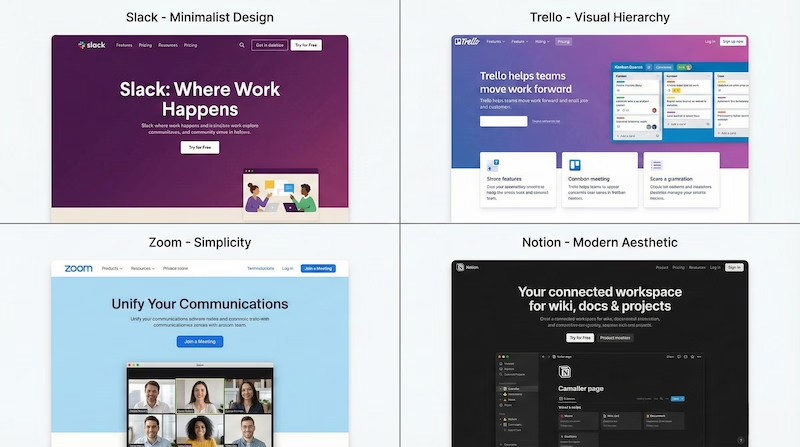
Your navigation structure determines how easily users find information. Best practices include:
- Maximum 7 main navigation items: Prevents choice overload
- Sticky headers: Keep navigation accessible while scrolling
- Clear CTAs: "Start Free Trial" or "Get Started" prominently displayed
- Logical hierarchy: Features → Pricing → Resources → Company

Hero Section Optimization
The hero section has approximately 3 seconds to capture attention. Essential elements:
Headline Formula: [Benefit] + [Timeframe] + [Without Pain Point]
Example: "Increase team productivity by 40% without changing your workflow"
Supporting Elements:
- Subheadline explaining how
- Primary CTA button (high contrast)
- Secondary CTA for hesitant visitors
- Social proof snippet (customer count or rating)

Feature Presentation Strategies
Don't just list features—show benefits and outcomes:
- Use icons: Visual processing is faster than reading
- Group related features: Create logical categories
- Show, don't tell: Screenshots and animations demonstrate value
- Connect to outcomes: "Automated reports → Save 5 hours weekly"
Real-World SaaS Website Examples
Learning from successful SaaS platforms accelerates your design process.
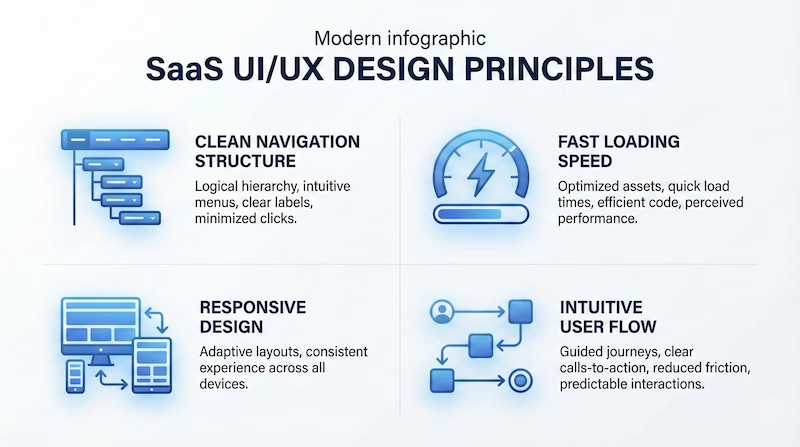
Slack: Simplicity and Clarity
Slack's website demonstrates masterful simplicity:
- Clean hero: One clear message with product visualization
- Progressive disclosure: Information reveals as users scroll
- Strong social proof: Fortune 500 logos and statistics
- Consistent branding: Purple accent maintains recognition
Key Lesson: Remove everything that doesn't drive conversions.
Notion: Versatility Showcase
Notion faces the challenge of explaining a versatile product:
- Template gallery: Shows possibilities without overwhelming
- Use-case segmentation: Different pages for different users
- Interactive examples: Embedded Notion pages demonstrate features
- Community focus: User-generated content builds trust
Key Lesson: Let the product demonstrate itself.
HubSpot: Enterprise-Grade Trust
HubSpot targets larger businesses requiring extensive trust-building:
- Comprehensive resources: Blog, academy, certifications
- Detailed case studies: ROI-focused success stories
- Free tools: Value before purchase
- Clear upgrade paths: From free to enterprise
Key Lesson: Provide value at every stage of the buyer journey.
Marketing and Conversion Strategies
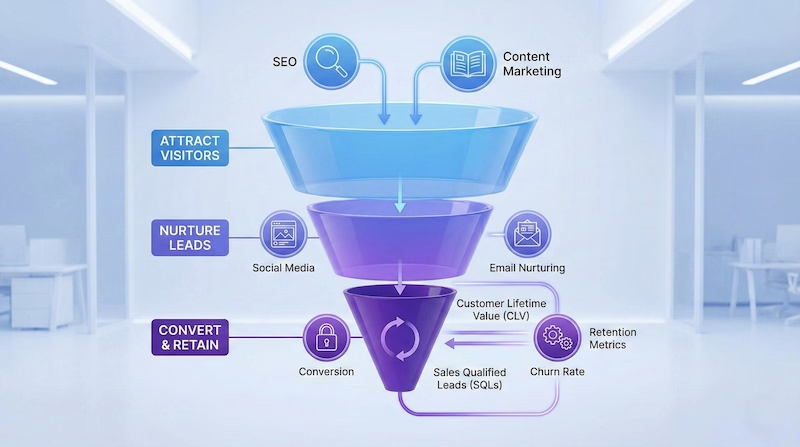
Beautiful design without strategy wastes resources. Effective SaaS marketing integrates with design.

Landing Page Optimization
Different traffic sources need different landing pages:
Paid Traffic Pages:
- Single focused CTA
- Message matches ad copy
- Minimal navigation (reduce exit points)
- Strong urgency elements
Organic Traffic Pages:
- Educational content
- Multiple CTAs at different commitment levels
- Internal linking to related content
- Newsletter capture for nurturing

A/B Testing Framework
Systematic testing improves conversion rates over time:
Priority Testing Elements:
- Headlines (highest impact)
- CTA button text and color
- Social proof placement
- Pricing presentation
- Form field count
Testing Rules:
- One variable at a time
- Statistical significance before decisions
- Document all tests and results
- Roll out winners site-wide
Email Capture Strategies
Email remains the highest-ROI marketing channel:
- Value-first offers: Ebooks, templates, free tools
- Exit-intent popups: Capture leaving visitors
- Content upgrades: Related resources within blog posts
- Free trial follow-ups: Nurture non-converters
Conversion Rate Optimization Deep Dive
CRO transforms good websites into great revenue generators.
Pricing Page Best Practices
Pricing pages often make or break conversions:
Structure Recommendations:
- 3 pricing tiers (avoid decision paralysis)
- Highlight recommended plan visually
- Annual vs monthly toggle (encourage annual)
- Feature comparison table
- FAQ section addressing objections
Psychological Techniques:
- Anchoring with highest tier first
- Decoy pricing to push middle tier
- Savings calculations for annual plans
- "Most Popular" badges
Reducing Friction Points
Every click and form field loses potential customers:
Form Optimization:
- Ask only essential information
- Enable social sign-up (Google, Microsoft)
- Show progress for multi-step forms
- Auto-fill where possible
Checkout Optimization:
- Guest checkout option
- Multiple payment methods
- Clear security indicators
- Money-back guarantee prominent
Social Proof Integration
Strategic social proof placement increases trust:
- Homepage: Customer logos and aggregate statistics
- Feature pages: Relevant testimonials per feature
- Pricing page: ROI-focused case studies
- Checkout: Security badges and guarantees

Measuring Success: Analytics and Metrics
Data-driven decisions outperform intuition consistently.

Key Performance Indicators
Track these metrics to understand website performance:
Traffic Metrics:
- Unique visitors
- Traffic sources
- Bounce rate by page
- Time on site
Conversion Metrics:
- Visitor-to-trial rate
- Trial-to-paid rate
- Free-to-paid conversion
- Revenue per visitor
Engagement Metrics:
- Page depth
- Feature page views
- Pricing page visits
- Demo requests
Analytics Tools Setup
Essential tools for SaaS website analytics:
- Google Analytics 4: Traffic and behavior analysis
- Hotjar/FullStory: Session recordings and heatmaps
- Mixpanel: Product analytics integration
- Google Search Console: SEO performance
Interpreting Data for Decisions
Numbers without context mislead:
Red Flags:
- High pricing page views, low conversions → pricing issues
- High time on page, low CTA clicks → confusing messaging
- Mobile bounce rate higher than desktop → responsive issues
- High blog traffic, low product interest → wrong audience
Technical Implementation Considerations
Design decisions affect technical performance and vice versa.
Performance Optimization
Speed directly impacts conversions:
- Target: Under 3 seconds load time
- Optimize images: WebP/AVIF formats, lazy loading
- Minimize JavaScript: Only essential scripts
- CDN usage: Global content delivery
- Caching strategy: Browser and server caching
Mobile-First Design
Over 50% of SaaS research happens on mobile:
- Touch-friendly buttons: Minimum 44px tap targets
- Readable typography: 16px minimum font size
- Simplified navigation: Hamburger menus done right
- Fast mobile experience: Optimized for 3G connections
SEO Integration
Organic traffic provides sustainable growth:
- Technical SEO: Fast loading, proper structure
- Content SEO: Keyword-targeted pages
- Local SEO: If targeting specific regions
- Link building: Quality over quantity
Building Your SaaS Website: Action Steps
Transform this knowledge into action with a structured approach.
Phase 1: Research and Planning (Week 1-2)
- Analyze competitor websites
- Define target user personas
- Map customer journey stages
- Create information architecture
- Set conversion goals
Phase 2: Design and Prototyping (Week 3-4)
- Create wireframes for key pages
- Design high-fidelity mockups
- Gather stakeholder feedback
- Conduct user testing
- Iterate based on feedback
Phase 3: Development and Launch (Week 5-8)
- Build responsive templates
- Integrate analytics tools
- Set up A/B testing infrastructure
- Performance optimization
- Quality assurance testing
Phase 4: Optimization (Ongoing)
- Monitor key metrics weekly
- Run systematic A/B tests
- Gather user feedback
- Iterate on underperforming pages
- Scale what works
Conclusion
Effective SaaS website design combines psychology, strategy, and technical execution. The best platforms continuously test and improve based on data.
Start with fundamentals: clear value proposition, intuitive navigation, and strategic CTAs. Build trust through social proof and professional design. Then optimize relentlessly based on user behavior.
Remember: your website is your best salesperson. Invest in making it convert.
Ready to build your SaaS website? Start with the fundamentals covered in this guide. For technical implementation, see how I work with SaaS startups or compare your options in the agency vs freelancer guide.